
Scientific Notation Calculator
Chemistry, physics and astronomy use scientific notation to handle very large and very small numbers. Type two numbers in any form — 6.02 × 10^23, 6.02e23 or 0.000 45 — choose an operation, and the calculator shows the working step by step, applies the significant-figure rules for that operation and gives the answer in scientific, E and standard notation.
- Free to use
- No sign-up
- Runs in your browser
Scientific notation calculator
Accepted: 3.2 x 10^5, 3.2×10^-4, 3.2*10^(−4), 3.2e5, 0.00045, 45000.
Scientific Notation Worksheets
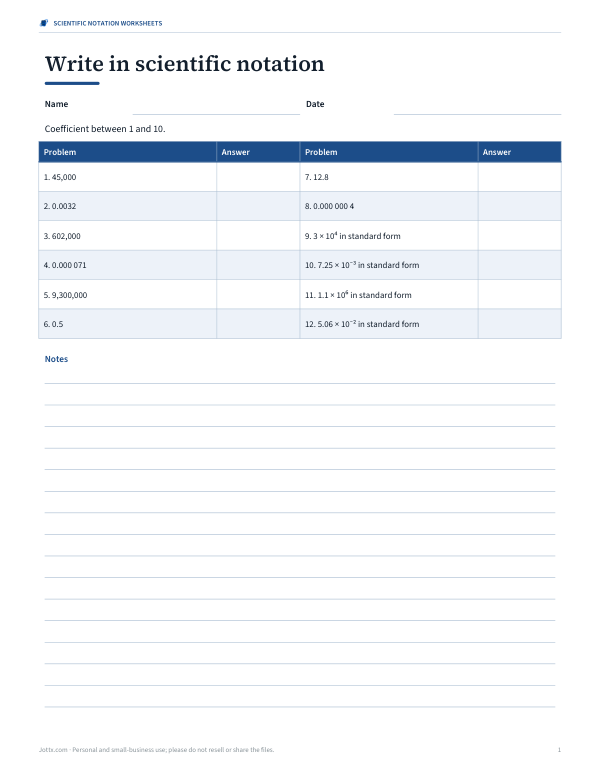
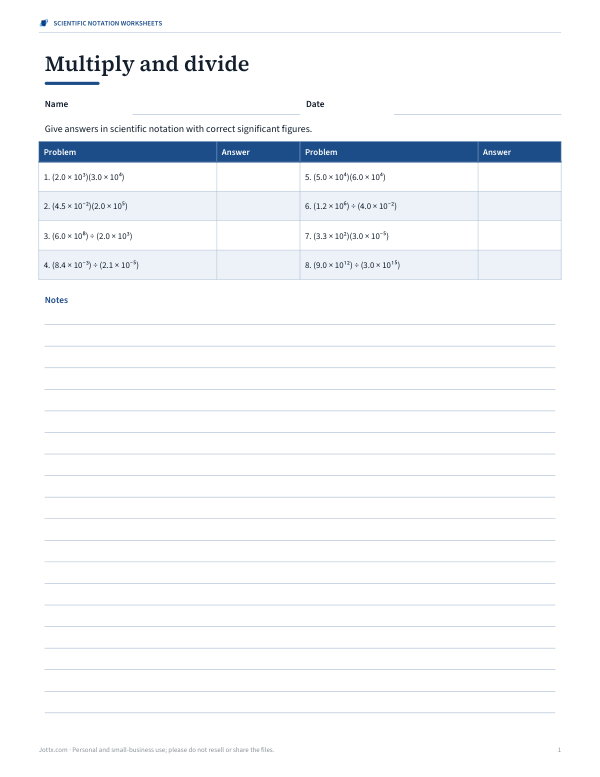
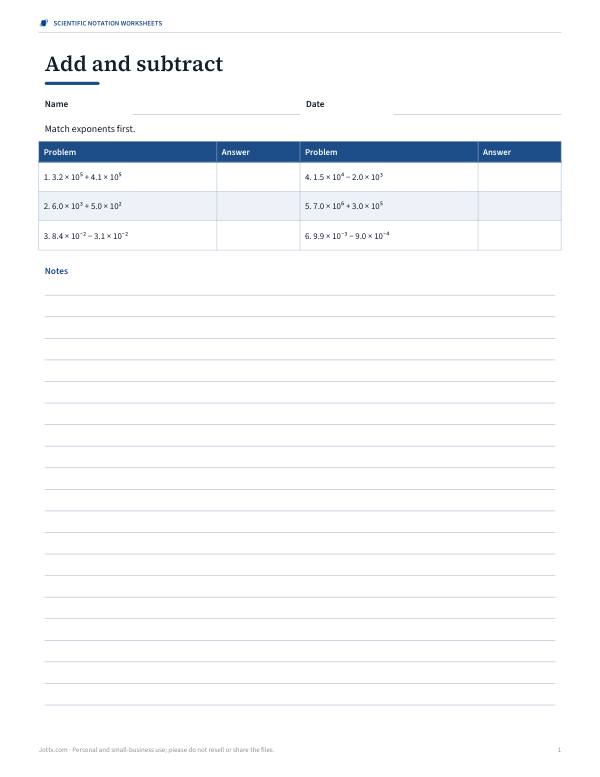
Printable scientific notation practice with answer keys: converting, multiplying and dividing, adding and subtracting, significant figures and a science word-problem set.
- Converting worksheet (PDF, DOCX)
- Multiply and divide (PDF, DOCX)
- Add and subtract (PDF, DOCX)
- Significant figures (PDF, DOCX)
Formats: PDF, DOCX. Instant download after payment (link valid 72 hours, up to 5 downloads). AI-assisted: the templates were drafted with AI help and reviewed and laid out before publishing.
$5.00 USD, one-time 4 files · about $1.25 each
- Instant download
- 7-day refund
- Secure checkout by Stripe
7-day money-back guarantee. Full refund within 7 days of purchase, even after you download.
Free sample: Sci Notation Add Subtract (PDF, 76 KB)
Full refund within 7 days — see the refund policy and license.
Free printables
Single sheets you can print right now, no sign-up. The full pack adds every sheet in one download plus the editable files.
 Printable Significant Figures Worksheet
What is scientific notation?
Scientific notation writes a number as a coefficient between 1 and 10 multiplied by a power of ten: 602,000,000,000,000,000,000,000 becomes 6.02 × 10²³, and 0.000 045 becomes 4.5 × 10⁻⁵. The exponent tells you how many places the decimal point moves — right for positive exponents, left for negative ones. On calculators and in spreadsheets the same number is often shown in E notation: 6.02E23.
Rules for calculating
| Operation | Coefficients | Exponents |
|---|---|---|
| Multiply | Multiply them | Add them |
| Divide | Divide them | Subtract them |
| Add or subtract | Add or subtract after matching exponents | Must be equal first |
| Power n | Raise to the power n | Multiply by n |
| Square root | Take the root (make the exponent even first) | Halve it |
After each operation, adjust the answer so the coefficient is at least 1 and less than 10: 45.6 × 10³ becomes 4.56 × 10⁴, and 0.72 × 10⁻² becomes 7.2 × 10⁻³.
Significant figures
| Rule | Example |
|---|---|
| Non-zero digits are significant | 3.42 has 3 |
| Zeros between digits are significant | 4.05 has 3 |
| Leading zeros are not | 0.0045 has 2 |
| Trailing zeros after a decimal point are | 2.500 has 4 |
| Trailing zeros in a whole number are ambiguous | 4500 has 2, 3 or 4 — scientific notation removes the doubt |
| × and ÷: fewest significant figures | 2.5 × 3.42 = 8.6 |
| + and −: fewest decimal places | 12.1 + 0.345 = 12.4 |
How to use the calculator
- Type the first number in any accepted form.
- Choose the operation.
- Type the second number, or a whole-number power.
- Choose whether to apply significant-figure rules or show full precision.
- Read the answer in scientific, E and standard notation, and follow the steps.
Worked example: moles of molecules
How many molecules are in 0.030 mol of water? Multiply by Avogadro’s number: (6.02 × 10²³) × (3.0 × 10⁻²). Multiply the coefficients: 6.02 × 3.0 = 18.06. Add the exponents: 23 + (−2) = 21. That gives 18.06 × 10²¹, which normalises to 1.806 × 10²². The inputs have 3 and 2 significant figures, so the answer is rounded to 2: 1.8 × 10²² molecules.
Worked example: adding
Add 3.2 × 10⁵ and 4.5 × 10³. Rewrite the smaller number with the larger exponent: 4.5 × 10³ = 0.045 × 10⁵. Add the coefficients: 3.2 + 0.045 = 3.245, giving 3.245 × 10⁵. The first number is only known to the 10⁴ place (3.2 × 10⁵ = 320,000), so the answer is rounded there: 3.2 × 10⁵. Adding a small number to a much larger one often changes nothing at the precision you know.
Common mistakes
- Forgetting to normalise — 45 × 10³ is not in proper scientific notation.
- Adding exponents when adding numbers (only multiply/divide change exponents that way).
- Sign errors with negative exponents: 10⁻³ × 10⁻⁴ = 10⁻⁷.
- Entering 10^5 on a calculator as 10 E5 (which means 10 × 10⁵).
- Rounding in the middle of a calculation — keep extra digits until the end.
Engineering notation and SI prefixes
| Power | Prefix | Symbol | Example |
|---|---|---|---|
| 10¹² | tera | T | 1 TB of storage |
| 10⁹ | giga | G | 2.4 GHz Wi-Fi |
| 10⁶ | mega | M | 5 MW wind turbine |
| 10³ | kilo | k | 10 km run |
| 10⁻³ | milli | m | 250 mL cup |
| 10⁻⁶ | micro | µ | 7 µm red blood cell |
| 10⁻⁹ | nano | n | 550 nm green light |
| 10⁻¹² | pico | p | 10 pF capacitor |
Engineering notation keeps the exponent a multiple of three so the number matches a prefix: 4.7 × 10⁻⁵ F is written 47 × 10⁻⁶ F, or 47 µF.
Entering numbers on a calculator
Most scientific calculators have an EXP, EE or ×10ˣ key. To enter 6.02 × 10²³, type 6.02, press EXP, then type 23 — don’t type “× 10” as well, or the calculator will multiply by ten again. For negative exponents use the (−) key, not the subtraction key. In spreadsheets and programming languages, type 6.02E23 or 6.02e-3.
Order of magnitude
The exponent alone gives a quick sense of size, called the order of magnitude. A number with exponent 3 is in the thousands; exponent −6 is in the millionths. When checking an answer, estimate with powers of ten first: (6 × 10²³)(3 × 10⁻²) should be around 18 × 10²¹ — about 10²² — so a result of 10²⁵ signals a slip.
Where you meet scientific notation
Scientists use it for the mass of an electron (9.109 × 10⁻³¹ kg), the distance to the Sun (1.496 × 10¹¹ m), the speed of light (2.998 × 10⁸ m/s) and the number of cells in the human body (roughly 3 × 10¹³). Engineers use a variant, engineering notation, where the exponent is a multiple of three to match prefixes such as kilo, mega, milli and micro.
Frequently asked questions
How do you multiply numbers in scientific notation?
Multiply the coefficients, add the exponents, then normalise.
How do you add numbers in scientific notation?
Rewrite them with the same exponent, add the coefficients, then normalise.
How many significant figures should my answer have?
For × and ÷, the fewest in the inputs; for + and −, round to the least precise decimal place.
What is E notation?
A calculator form where 3.2E5 means 3.2 × 10⁵.
Can I use negative exponents?
Yes, like 3.0 x 10^-2 or 3.0e-2.
Does it show steps?
Yes, every calculation shows its working.
Why is 45000 treated as having 2 significant figures?
Trailing zeros without a decimal point are ambiguous; write 4.5000 × 10⁴ to show they are significant.